AI with Sinalio: From Feedback to Changelog with Opus 5.5 and GPT-6 Sol
Use AI with Sinalio to review feedback, prepare product decisions, and write updates users understand. Includes MCP prompts and the manual dashboard workflow.
Updated

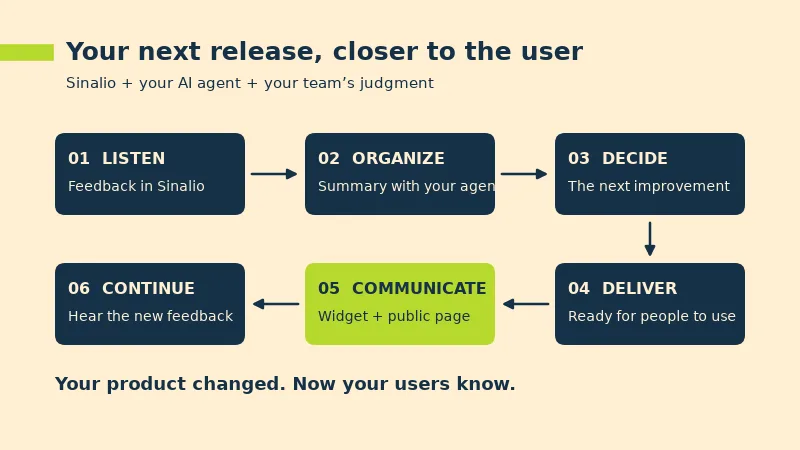
Your product changed. Do your users know? Opus 5.5 and GPT-6 Sol are expanding what a team can build and write with AI. For SaaS teams, the next opportunity is to carry that pace through to the customer experience: hear what users need, choose an improvement, and show them how to use it.
That is where Sinalio fits. Feedback arrives from inside your product with page and environment context. Updates reach users through the widget and can be shared on a public changelog page. You can run this workflow in the web dashboard or use an agent connected to Sinalio through MCP.
This guide gives you a routine for your next release: AI helps organize and write; Sinalio keeps the team close to the user.
Sinalio gives your AI workflow useful context
When reviewing feedback in Sinalio, your team has the report alongside its page and environment of origin. An agent can use that context to prepare a summary and, after delivery, draft an update explaining the benefit.
To follow the examples, connect Sinalio to a compatible MCP client, select your workspace, and authorize the actions you need. Use the model available in that client, such as Opus 5.5 in Claude or GPT-6 Sol in Codex.
1. Turn user reports into a product discussion
Start with a focused question. Choose a time period, environment, and area of the product. The output should help you decide what deserves attention in your next team discussion.
A prompt to try:
In the [product name] workspace, review feedback from the past seven days in Production. Group reports by the user's problem. For each group, give me one sentence describing the difficulty, the feedback IDs supporting the summary, and a question our team should answer. Suggest three topics to discuss first and explain why.
Imagine a SaaS where users ask to keep their customer-list filters for the next visit. The page context shows where the request started; the summary helps you see the task: resume an analysis without setting up the list again.
That description is useful input for your roadmap. You can assess an improvement by the work it makes easier, alongside effort and product direction. For more on collecting that input, read our guide to user feedback for SaaS.
2. Turn delivery context into a product update
When development is complete, give the agent the confirmed changes and the steps a customer should follow. In Codex or another development agent, you can use the work context already available in that task and combine it with feedback retrieved from Sinalio.
A prompt for your changelog:
Use the feedback about filters we just reviewed and these shipped changes: [describe the release]. Create an English product-update draft in Sinalio. Write a benefit-focused title, a short explanation of who the change helps, and the steps to use it. Show me the complete draft for review before publishing.
Example copy for the SaaS in this scenario:
Return to your customer list with your filters ready
Your filters now stay saved for your next visit. When you return to the customer list, you can pick up your analysis with the options you already selected.
The user can recognize what changed and how it helps their work. That is the kind of communication we aim for with Sinalio.
3. Bring the improvement to your users
Review the draft, check the language and environment, and confirm publication. The widget brings the update inside your SaaS; the public page gives you a link to share with customers, prospects, and partners. Together, they help you show the work your team has delivered.
For English and Portuguese audiences, ask for a version in each language and review your product terminology. Sinalio keeps localized versions of the same update.
The same release can become a help article. Ask AI to turn the instructions into a guide with prerequisites, steps, and the expected result; then review and add it to your knowledge base. The changelog introduces the improvement, while the documentation teaches people to use it. See how a public changelog and in-app widget work together.
Opus 5.5 or GPT-6 Sol: choose for your workflow
Anthropic highlights writing and style instruction following in Opus 5.5. Our suggestion is to try it for updates, translations, and guides that need a thoughtful explanation. Provide examples of your brand's tone and ask for shorter revisions until the draft sounds like something your team would publish.
GPT-6 Sol combines text generation with tool use. If you already work in Codex, a practical routine is to gather delivery context, consult feedback through MCP, and prepare the Sinalio draft in the same task.
Try both with the same release. Choose the draft that best explains the benefit, gives useful steps, and sounds like your team.
You can follow the same routine in the dashboard
Here is the manual workflow:
- Open feedback in Sinalio and select a problem to discuss with your team.
- After delivery, write an update with the benefit, audience, and steps to use it.
- Review and publish it for users in the widget and on the public page.
With or without an agent, the purpose is clear: help users take part in the product's evolution and see the result.
Start with your SaaS's next improvement
Choose a request you are about to address. Receive context through Sinalio and prepare the communication while the delivery is still fresh in your team's memory. Publish when the change reaches users.
Your team builds. Sinalio brings that progress closer to the customer. Create your account, explore the plans, and get your workspace ready for the next update.